
Over time, the wild dino population on an ARK server drifts toward whatever's been spared by players and PvE - usually meaning fewer high-level wilds in the open. A scheduled wild dino wipe runs the destroywilddinos RCON command to clear the wild population so the next spawn cycle generates a fresh distribution with full level variety.
v0.8.3 also includes a fix (BUG-12) for the "wipe ran but reported failure" issue from earlier builds, so the success banner is now reliable.
Prerequisites:
- A server already added to AASM.
- RCON working on this server (it's how the wipe command is issued).
Step 1 - Open Maintenance & Management
Server tab → Maintenance sub-tab → Maintenance & Management internal sub-tab.
Step 2 - Find the Dino Management card
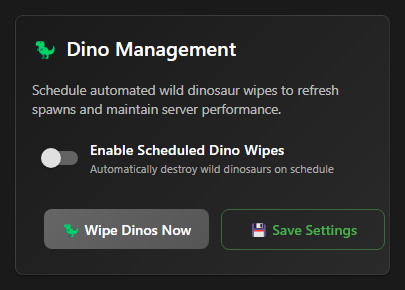
Scroll down past Quick Settings and Automated Restart Scheduling until you see the purple Dino Management card.
Step 3 - Optionally: do a one-shot wipe right now
If you just want to wipe immediately (no schedule), click Wipe Dinos Now. AASM issues destroywilddinos via RCON and shows a success snackbar. Player-tamed dinos and structures are untouched - this only affects wild populations.
Wild dino wipes are visible to players (suddenly the map empties for a few minutes). Run them at low-population hours or announce them on Discord beforehand.
Step 4 - Enable Scheduled Dino Wipes
Flip Enable Scheduled Dino Wipes on. The card expands to show frequency, time, and message fields - similar shape to the restart scheduler.
Step 5 - Choose the wipe cadence
Wild wipes can run daily, every few days, or weekly:
- Daily - every 24h at the time you set. Common for fast-cycling boost-event servers.
- Every X Days - every 2 to 7 days at the chosen time. Common for moderate-pop PvE.
- Day of Week - pick a specific weekday (Sunday, Monday, etc.) + time.
Step 6 - Customize the pre-wipe and post-wipe messages
Two text fields let you customize what AASM broadcasts in-game just before and after the wipe:
- Pre-Wipe Message - sent ~30s before the wipe runs. Default: "Wild dinos are about to be wiped to refresh spawns!"
- Post-Wipe Message - sent immediately after. Default: "Wild dinos have been wiped. New spawns incoming!"
Customize them to match your community's voice (or in another language for international servers).
Step 7 - Save Settings
Click Save Settings at the bottom of the Dino Management card. The schedule persists and the dashboard's Maintenance Hub will show the countdown to the next wipe alongside the next scheduled restart.
Wild Dino Wipe Scheduling - done
Wild dinos will now wipe on the cadence you set, with the messages you wrote announcing it in-game. Use Wipe Dinos Now whenever you need an ad-hoc refresh outside the schedule.